Improving displaying FullCalendar for Oracle APEX on mobile devices
Last modified on October 2, 2026 • 1 min read • 181 wordsEven with the last version of Oracle APEX (22.2) which embeds Version 5 of FullCalendar, displaying can be slighty improved to give a better rendering on mobile devices.
Below are two samples emulated on iphone 6: First one is a displaying with default values, Second is a a calendar with some additional actions.
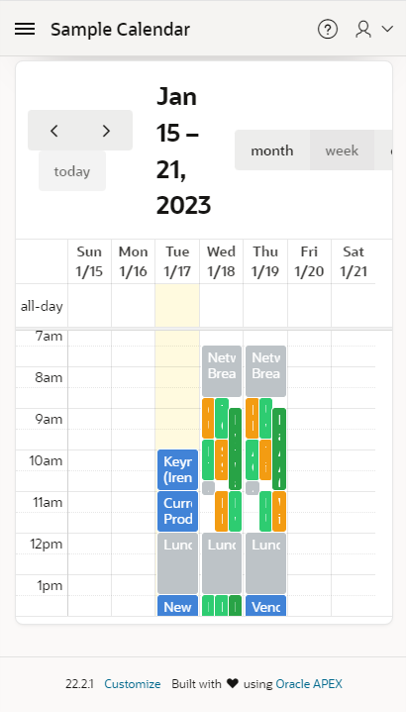
In the default version, the title for Contextual dates are too larges and some buttons are not displayed. The navigation buttons are confusing.
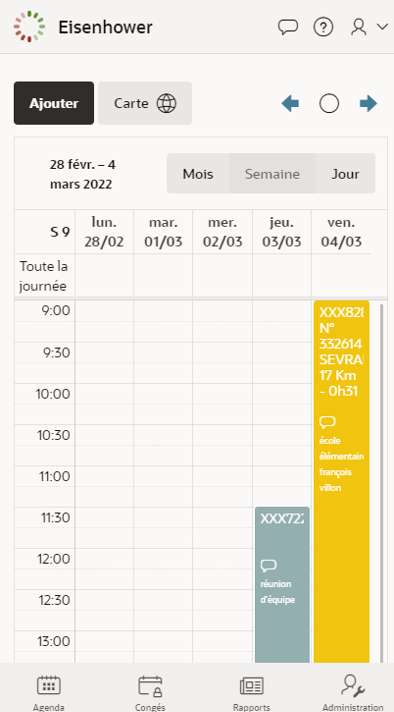
In the customized version, the navigation button are better reachable at right side with more intuitive icons, size of contextual date is reduced and view buttons are displayed entirely.
Additional actions
In the improved version, we:
-
Hide navigation option in Calendar Views and Navigation section
The standard arrows will be replaced by customized buttons -
Add three buttons in EDIT section of the Calendar region
-
Previous
-
DA on button:
apex.region("calendar").widget().data("fullCalendar").prev(); -
ico: fa-arrow-left-alt u-color-1-text
-
-
Today
-
DA on button:
apex.region("calendar").widget().data("fullCalendar").today(); -
icon: fa-pie-chart-0
-
-
Next
-
DA on Button:
apex.region("calendar").widget().data("fullCalendar").next(); -
icon: fa-arrow-right-alt u-color-1-text
-
-
-
override class style at the page level in INLINE CSS section
.fc .fc-toolbar-title { font-size: small; }